Architecture
Intel® AI for Enterprise RAG is the application layer of the Intel® AI for Enterprise Solutions platform. It contributes a 15-component erag layer that deploys RAG pipelines, microservices, and UI onto the platform's Kubernetes, Istio mesh, PostgreSQL, and Keycloak/LiteLLM infrastructure.
This doc covers what the layer actually is, how its components compose into a working RAG application, and how it integrates with the inference and platform layers below it.
Integration with Enterprise AI Solutions
Enterprise AI Solutions clones this repo into its own ext/enterprise.ai-erag/ at runtime and auto-discovers its contributions:
| File | Purpose |
|---|---|
deployment/components.yaml | Registers 15 app_* components in the erag layer with dependency order |
deployment/pipelines/<flavour>/config.yaml | Per-flavour baseline config, seeded to env/<name>/config.erag.yaml by init erag --flavour <flavour> |
deployment/roles/ | 21 Ansible roles (15 in the component registry + 6 helpers) |
deployment/components/ | Helm charts per component (apisix, audio, chat_history, edp, ferretdb, fingerprint, gmc, hpa, mcp_gateway, nats, postgresql, ui, utils, vector_databases) |
deployment/pipelines/ | 5 pipeline flavours: chatqna, docsum, audioqna, translation, pl_chatqna |
The installer adds deployment/roles/ to ANSIBLE_ROLES_PATH, merges components.yaml into the component registry, and loads config.erag.yaml via -e @....
Commands
# Initialize a RAG environment (from Enterprise AI Solutions repo root)
./es_auto_installer.sh init erag --env myenv

# Install the erag layer (requires inference layer already installed)
./es_auto_installer.sh install erag --env myenv

# Check status
./es_auto_installer.sh status --env myenv
./es_auto_installer.sh validate erag --env myenv
Layer Dependencies
The erag layer depends on platform and inference:
infrastructure  →  platform  →  inference  →  erag
                   (Istio,      (KServe,      (RAG app,
                    Keycloak,    vLLM,         pipelines,
                    CNPG,        Envoy AI      vector DB,
                    Envoy GW)    Gateway)      EDP, UI)
At install time Enterprise AI Solutions resolves these dependencies and deploys layers in order.
Component Registry
15 components registered in deployment/components.yaml, executed in dependency order.
The Enabled column is the fallback in components.yaml, used only when nothing sets the toggle. Every shipped flavour's config.yaml turns on vector_databases, chat_history, edp, ui, hpa and mcp, so a default init erag --flavour chatqna deploys all of them. The fallback matters when you write your own config or explicitly disable a component.
| Component | Enabled (registry fallback) | Depends on | Purpose |
|---|---|---|---|
app_inference_models | Yes | - | Deploys LLM/embedding/reranking models via model-manager, waits for readiness |
app_pre_install | Yes | app_inference_models | Creates namespaces, configures RBAC, provisions shared secrets |
app_vector_databases | No (on in every flavour) | app_pre_install | Deploys Redis/MSSQL/pgvector vector store |
app_keycloak_config | Yes (unless keycloak_enabled=false) | app_pre_install | Creates Keycloak realm, clients, role mappings for RAG services |
app_apisix | Yes | app_pre_install | Deploys APISIX API gateway, provisions ClusterRole for ApisixRoute watchers |
app_chat_history | No (on in every flavour) | app_pre_install, app_apisix | Chat conversation history service |
app_nats | Yes | app_pre_install | NATS JetStream for GMC router state (NKey auth) |
app_fingerprint | Yes | app_pre_install, app_apisix, app_nats | System fingerprint service for config integrity |
app_hpa | Yes | app_pre_install | Horizontal Pod Autoscaler for pipeline microservices |
app_pipeline | Yes | app_pre_install, app_hpa, app_nats, app_fingerprint | Composes and deploys the selected pipeline via GMC |
app_edp | No (on in every flavour) | app_vector_databases, app_apisix, app_hpa | Enhanced Data Preparation (Celery + FastAPI + SQLAlchemy) |
app_mcp_gateway | No (on in every flavour) | app_edp, app_keycloak_config | Model Context Protocol gateway (FastMCP) |
app_ui | No (on in every flavour) | app_pipeline, app_apisix | React UI (chatqna / docsum / audioqna apps) |
app_watcher | Yes | app_pre_install | Namespace status watcher for reboot recovery |
app_post_install | Yes | - | Prints access URLs, credentials, validation summary |
Helper roles (included by other roles, not in the registry): app_audio, app_check_pods, app_data_consistency, app_deployment_manifest, app_generate_password, app_password_mgmt.
Microservices
Each step of a RAG answer is its own service, which is what lets you swap a reranker, insert a query-rewrite step, or scale embedding independently of the LLM without touching anything else. The trade-off is more moving parts to understand, so the map and table below group them by the role they play.
21 FastAPI microservices in src/comps/, packaged as Docker images and deployed via Helm. That is 18 top-level services plus the three guardrails sub-services. src/comps/cores/ and src/comps/vectorstores/ are shared libraries the services import, not deployed services of their own.
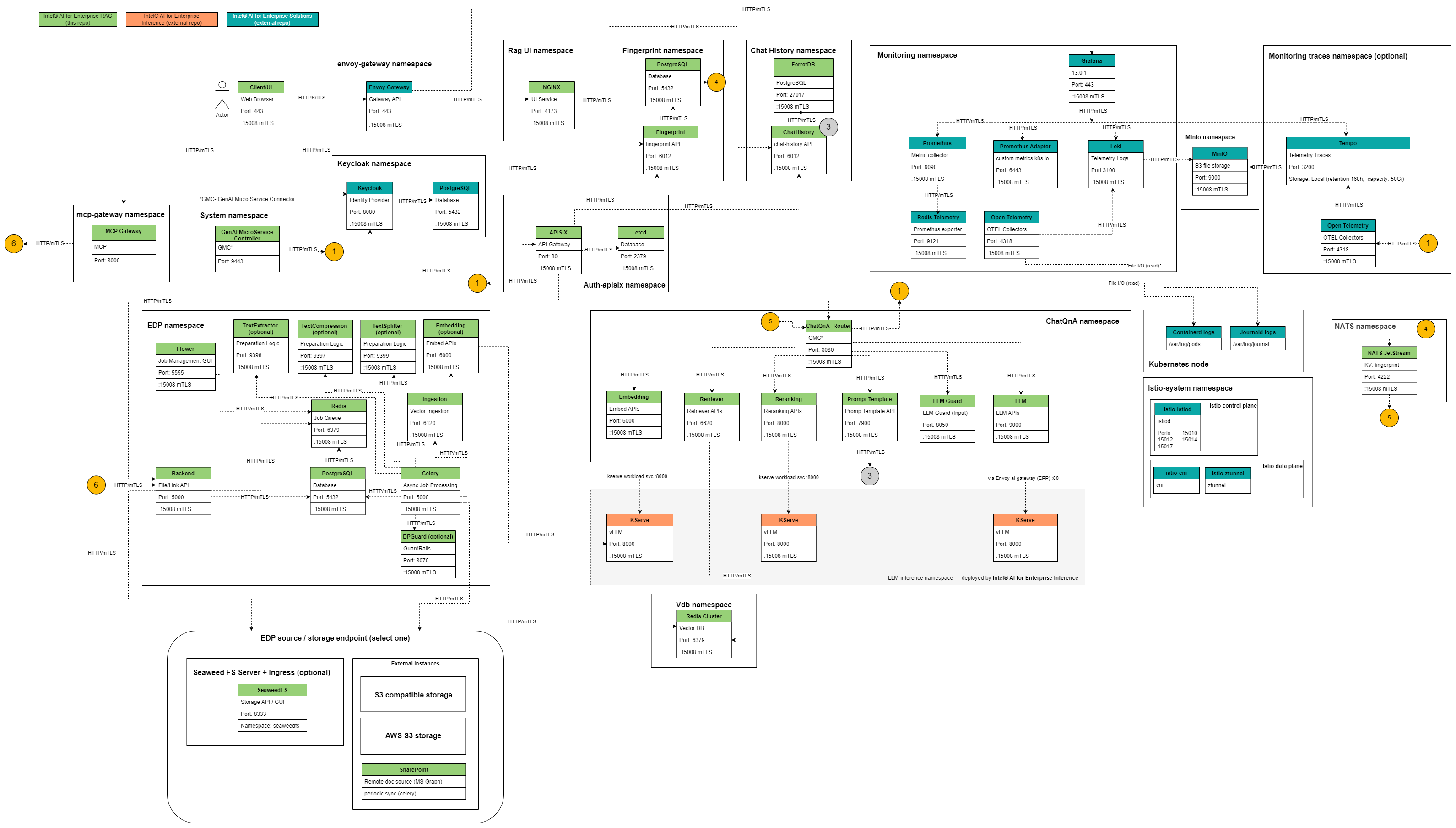
| Service | Purpose | Namespace (default) |
|---|---|---|
asr | Automatic speech recognition | chatqna (or pipeline-specific) |
chat_history | Conversation history storage | chatqna |
docsum | Document summarization | docsum |
embeddings | Text embedding via model endpoint | chatqna |
guardrails (3 variants) | Input/output/dataprep content filtering | chatqna, edp |
ingestion | Document upload and storage | edp |
language_detection | Language identification | chatqna |
late_chunking | Late-chunking embedding strategy (not supported on the current model servers - see Models) | chatqna |
llms | LLM request proxy | chatqna |
namespace_status_watcher | Monitors namespace health | default |
prompt_template | Prompt template rendering | chatqna |
query_rewrite | Query rewriting for improved retrieval | chatqna |
reranks | Reranking service | chatqna |
retrievers | Vector/BM25 retrieval | chatqna |
system_fingerprint | Config fingerprinting | chatqna |
text_compression | Text compression | chatqna |
text_extractor | Text extraction from docs | edp |
text_splitter | Chunking service | edp |
tts | Text-to-speech | audioqna |
Images built from src/comps/*/impl/microservice/Dockerfile, published to docker.io/intel/enterprise-rag-<service>. Default tag matches the solution version (3.0.0).
GMC Operator
The GMC operator (src/gmc/) is a kubebuilder-based controller that composes microservices into a working pipeline. It defines the CRD GMConnector (API group gmc.erag.intel.com, version v1alpha3) with three router types:
| Router | Purpose | Example |
|---|---|---|
Sequence | Linear flow | embedding → retriever → reranking → prompt-template → llm |
Ensemble | Parallel branches whose outputs are merged | Two retriever branches feeding one fusion step |
Switch | Conditional routing | Supported by the operator; no shipped flavour uses it |
The router pod (intel/enterprise-rag-gmcrouter) sits at the pipeline's edge and dispatches requests step-by-step. The manager pod (intel/enterprise-rag-gmcmanager) reconciles GMConnector CRs and provisions step Services/Deployments/ConfigMaps.
Pipeline Composition
Pipelines are modular definitions in deployment/pipelines/<flavour>/. Each flavour declares:
| File | Content |
|---|---|
pipeline.yaml | Metadata (namespace, base_flow, endpoints, router) |
config.yaml | Flat override surface for this flavour (components enabled, models, resources) |
variants/ (optional) | Alternate flows: query-rewrite, output_guard, retrieve-rerank, upload |
Base step definitions live in deployment/pipelines/_shared/steps/*.yaml.j2 (unified step + resources). A flavour may add a local steps/ to override shared steps.
At install time deployment/scripts/compose_pipeline.py composes the selected pipeline + variant into a GMConnector CR written to env/<name>/logs/rag/gmconnector-<pipeline>.yaml, which app_pipeline applies.
5 Flavours
| Flavour | Namespace | Base flow | Router | Description |
|---|---|---|---|---|
chatqna | chatqna | embedding → retriever → reranking → prompt-template → llm-guard-input → llm | Sequence | RAG question answering (default) |
docsum | docsum | text-extractor → text-compression → text-splitter → llm → docsum | Sequence | Document summarization |
audioqna | chatqna | Same as chatqna | Sequence | Thin flavour: ChatQnA graph plus audio_enabled: true. ASR and TTS are a runtime add-on in the audio namespace, not graph steps |
translation | translation | language-detection → prompt-template → llm | Sequence | Translation, served by alma-7b-r |
pl_chatqna | chatqna | Same as chatqna | Sequence | Thin flavour: ChatQnA graph plus solution_language: pl and a Polish LLM |
Variants (chatqna only): output_guard, query-rewrite, retrieve-rerank, upload.
Only one pipeline runs at a time. Switching requires changing pipeline_type and pipeline_variant in config.erag.yaml and re-running install erag.
Enhanced Data Preparation (EDP)
EDP (src/edp/) is a FastAPI + Celery + SQLAlchemy pipeline for document ingestion and processing. It splits large uploads into async Celery tasks, chains ingestion → extraction → chunking → embedding → vector-store indexing, and persists job state in PostgreSQL.
| Component | Tech |
|---|---|
| API server | FastAPI |
| Task queue | Celery + Redis broker |
| Database | PostgreSQL (CNPG cluster) |
| Storage | SeaweedFS (default) / S3 / S3-compatible |
Endpoints: /v1/dataprep (upload), /v1/dataprep/get_files, /v1/dataprep/delete_files.
UI
3 React 18 / TypeScript apps in src/ui/apps/, built with Vite + Tailwind + pnpm workspace:
| App | Purpose | Route |
|---|---|---|
chatqna | Conversational RAG UI | https://erag-gateway.<domain>/ |
docsum | Document summarization | https://erag-gateway.<domain>/ |
audioqna | Audio question answering | https://erag-gateway.<domain>/ |
Each app is packaged as docker.io/intel/enterprise-rag-<app>-ui and deployed via the ui Helm chart. The UI hits the APISIX gateway, which routes to the GMC router service.
MCP Gateway
The MCP gateway (src/mcp_gateway/) exposes Model Context Protocol endpoints backed by the RAG pipeline. Built with FastMCP, it proxies tool calls to the pipeline and returns structured responses.
Enabled via mcp_enabled: true in config.erag.yaml. Requires app_edp and app_keycloak_config.
Namespaces
| Namespace | Owner | Purpose |
|---|---|---|
chatqna (or flavour-specific) | This layer | Pipeline microservices, GMC router |
edp | This layer | EDP API, Celery workers, PostgreSQL |
vdb | This layer | Vector database (Redis/MSSQL/pgvector) |
llm-inference | Inference layer | vLLM/OVMS model pods, KServe controller |
envoy-gateway-system | Platform layer | Envoy Gateway, AI Gateway |
keycloak | Platform layer | Keycloak |
monitoring | Platform layer | Prometheus, Grafana, Loki, Tempo |
All RAG namespaces join the Istio ambient mesh via istio.io/dataplane-mode: ambient label.
Istio Mesh Integration
The platform layer (roles/istio/) deploys Istio ambient mesh. RAG namespaces join the mesh by label; all inter-service traffic is mTLS-encrypted via ztunnel.
Current mTLS posture: STRICT via PeerAuthentication in each namespace. Authorization policies are not currently deployed - the deployment ships zero AuthorizationPolicy resources. Only mutual TLS is enforced; service-to-service authorization is not configured.
See Mesh for how to add a new service to the mesh.
Storage
- Vector database: PVC (default 30Gi) for Redis/MSSQL persistence
- EDP blob storage: SeaweedFS (default) / S3 / S3-compatible object store
- PostgreSQL: CNPG-managed volumes (8Gi per cluster by default)
- Model weights: Inference layer's model-store PVC (shared across layers)
- Backup and restore: opt-in, Velero-based CSI volume snapshots of the namespaces above plus the identity realm — see Backup and Restore
Telemetry
Grafana dashboards tagged EnterpriseRAG:
EnterpriseRAG / Services / Details- per-service CPU/memory, request rates, logsEnterpriseRAG / Services / EDP- ingestion stats, processing stages, errorsEnterpriseRAG / HPA- autoscaler activity and thresholds
Additionally, inference layer dashboards (modelserving tag) show vLLM/KServe metrics.
Logs flow to Loki via OpenTelemetry; traces go to Tempo. Access via https://grafana.<base_domain_name>.
See Telemetry for login and dashboard details.
Deployment Sequence
At install erag:
- app_inference_models: Deploys embedding, reranking, LLM models via
model-manager, waits forReady - app_pre_install: Creates namespaces, RBAC, secrets, labels namespaces for Istio
- app_vector_databases (if enabled): Deploys Redis cluster / MSSQL / pgvector
- app_keycloak_config (if enabled): Creates RAG realm, clients, groups in Keycloak
- app_apisix: Deploys APISIX gateway, provisions ClusterRole for watchers
- app_nats: Deploys NATS JetStream with NKey auth
- app_fingerprint: Deploys fingerprint service
- app_hpa (if enabled): Applies HPA resources
- app_pipeline: Composes GMConnector CR, deploys GMC operator + router + step services
- app_edp (if enabled): Deploys EDP API, Celery, PostgreSQL
- app_mcp_gateway (if enabled): Deploys MCP gateway
- app_ui (if enabled): Deploys React UI
- app_watcher: Deploys namespace status watcher
- app_post_install: Prints access URLs and credentials
Related
- Telemetry - Grafana dashboards, log queries
- Performance - Tuning model sizing, HPA, Redis vector index settings
- Docker Images - Published images and Dockerfiles
- Mesh - Istio integration and mTLS posture