Meet Intel® Inference Microservices
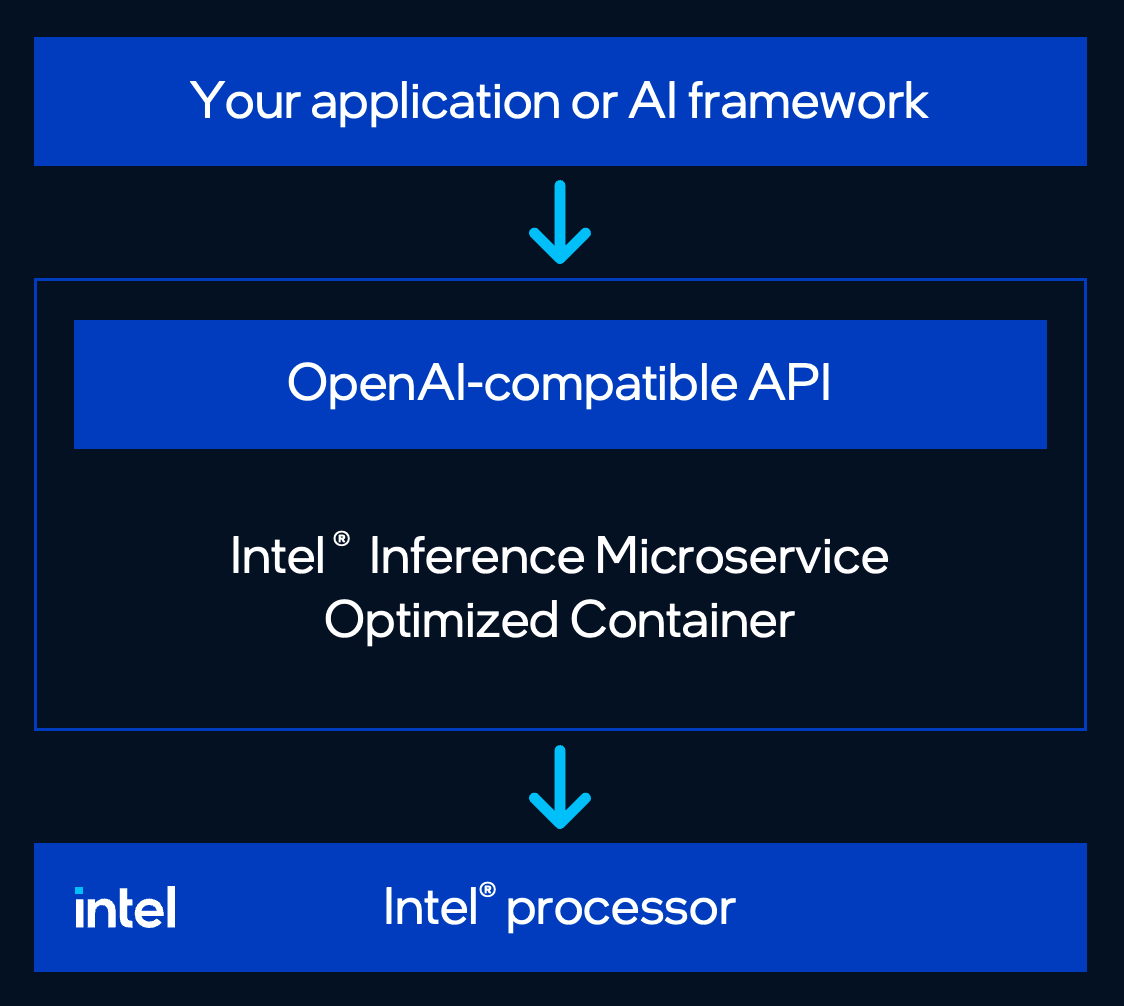
Intel® Inference Microservices is a container that serves a large language model on Intel® processors, using the same API you already use with OpenAI.
You pick the model. At startup the container looks at the Intel® processor (Intel® Xeon® CPU), applies the settings Intel® tuned and tested for that model, and starts.
What is Intel® Inference Microservices?
One container serves one model. Your app talks to it the same way it talks to OpenAI.
- You pick the model. Use a validated model Docker image from the Intel® Software Catalog, or a non-validated Hugging Face model on the base image.
- The container picks the settings. It looks at the processor, cores, memory layout, and instruction sets, then starts vLLM with a built-in configuration.
- Clients. curl, the OpenAI Python SDK, LangChain, LlamaIndex, LiteLLM, and Haystack. Point the base URL at the container.
- Hardware. Intel® Xeon® CPU this release (Intel® Xeon® 4, Intel® Xeon® 5, and Intel® Xeon® 6 processors). See Supported Intel® platforms.
Every validated model Docker image is listed in the Intel® Software Catalog. Open the model you want and copy the docker run from the Deployment tab.
Why is tuning an LLM hard?
Starting an inference container is easy. Getting strong, repeatable performance from the processor underneath it is where things get hard.
Teams usually have to decide:
- Which precision to use
- How to configure memory and parallelism
- Which engine options matter
- How to handle sockets and NUMA topology
- Whether to optimize for latency or throughput
- Which settings fit a given processor generation
That knowledge ends up scattered across benchmark scripts, long READMEs, and one-off launch commands.
This container does that step for you. At startup it looks at the Intel® processor (Intel® Xeon® CPU), applies the built-in configuration Intel® tuned for that model and that silicon, and starts the API.

Detects Intel® processors means the container inspects the processor, cores, memory layout (NUMA), and instruction sets (AMX / AVX-512 / AVX2 / VNNI). Then vLLM starts behind /v1/chat/completions and /v1/completions.
Today that means Intel® Xeon® CPU (Supported Intel® platforms) and the models in the Intel® Software Catalog.
If your model is in the catalog
Open the Intel® Software Catalog, find the model you want, and copy the docker run from the Deployment tab. The image already has the model and Intel®'s settings.
Each listing includes a docker run you can paste. This is an example of a gated listing (Llama 3.2 3B Instruct). Use the command from your listing, not this one.
docker run --rm -p 8000:8000 \
  --cap-add SYS_NICE \
  --shm-size=2g \
  -e HF_TOKEN=<your-token> \
  intel/inference-xeon-meta-llama-llama-3.2-3b-instruct:0.1.0
Gated models (Llama, Gemma) need a Hugging Face token: create a Read token and accept the license on the model page before you run the command — Quickstart. Putting the token on the command line writes it to Linux shell history — see Security. Ungated listings have no -e HF_TOKEN. The flags on that command (--cap-add SYS_NICE, --shm-size=2g) are the same as Quickstart.
This command downloads the model on every launch. To avoid that, see Model caching.
Deploy an image that isn't in the catalog
You can also use Intel® Inference Microservices to serve a model that is not in the catalog.
Run the base image — intel/inference-xeon-base:0.1.0. It is the same runtime as a catalog image. You pass the Hugging Face id (Org/Model-Name) as INFERENCE_MODEL_ID. The container downloads that model and serves it on the same OpenAI-compatible API.
# Hugging Face model ID, for example: Org/Model-Name
export MODEL_ID="Org/Model-Name"

docker run --rm -p 8000:8000 \
  --cap-add SYS_NICE \
  --shm-size=2g \
  -e INFERENCE_MODEL_ID="$MODEL_ID" \
  intel/inference-xeon-base:0.1.0
INFERENCE_MODEL_ID is required. Without it, the container will not start.
If Intel® has tested that model those settings are used. If not, the model still serves with default settings.
If the model is gated, add -e HF_TOKEN=<your-token> (create the token first — Quickstart). On Kubernetes, set INFERENCE_MODEL_ID under env: — Deploy on Kubernetes.
Always pin a version tag such as :0.1.0. Do not use :latest.

| Use this when | You pass | |
|---|---|---|
| Model image | The Intel® Software Catalog lists your model | Copy the docker run from the model's Deployment tab |
| Base image | Your model is not in the catalog, or you are not sure it is | INFERENCE_MODEL_ID — Environment variables |
Next steps
- Prerequisites — Docker, login, Hugging Face (if the model is gated).
- Quickstart — serve a model with Docker.
- Deploy on Kubernetes — this is how you run it in a cluster.
Also: Model catalog, Supported Intel® platforms, API reference, Glossary, FAQ.